
HUGO :
Hugo is a fast tool used to build websites, especially blogs, documentation sites, and personal websites. It is called a static site generator, which means it creates web pages using simple files instead of running a database every time someone visits the site. 🚀
Why People Use Hugo
- Very fast (builds sites in seconds)
- No database needed
- Secure because it generates static pages
- Easy to deploy online
- Great for blogs and documentation
HUGO INSTALLATION :
UPDATING SYSTEM :
First update your system by the command : sudo apt update
INSTALLING HUGO :
Then for installation of HUGO use the command : sudo apt install hugo
CHECK WHETHER HUGO IS INSTALLED OR NOT :
Hugo installation can be checked through this command : hugo version
FOR EXAMPLE :

- This shows that HUGO has been successfully installed.
CREATING A HUGO SITE :
Once HUGO is properly installed , we can use the command : hugo new site blog
Change the name of your blog accordingly.
SETTING THE THEME :
After this navigate to your site directory :
cd blog
After this initialize GITHUB to manage themes properly. Then choose any theme from the HUGO THEMES and copy its repository link. Using this command :
git submodule add github-url-to-theme themes/theme-name
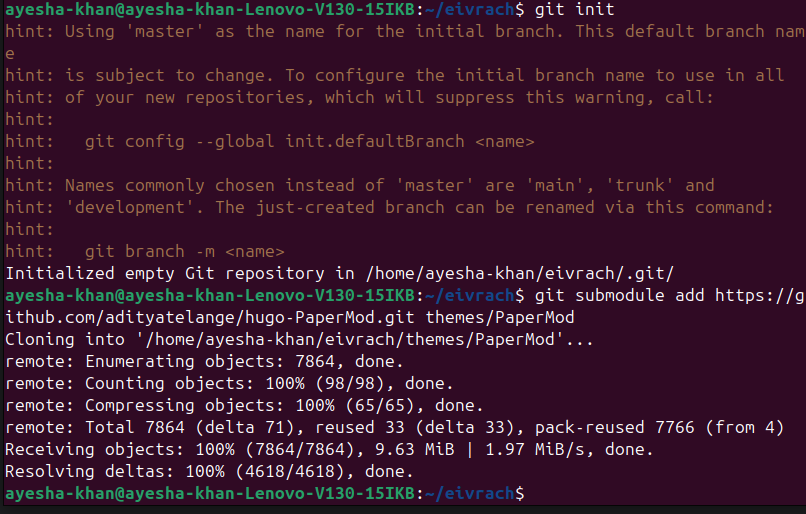
Then open the file hugo.tmol file and add your respective theme. For example :
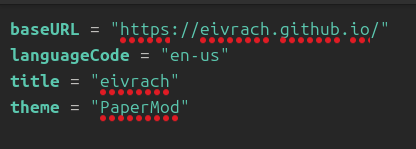
Without this change , HUGO won’t apply the theme design.
CREATE YOUR FIRST POST :
Generate a new post using command :
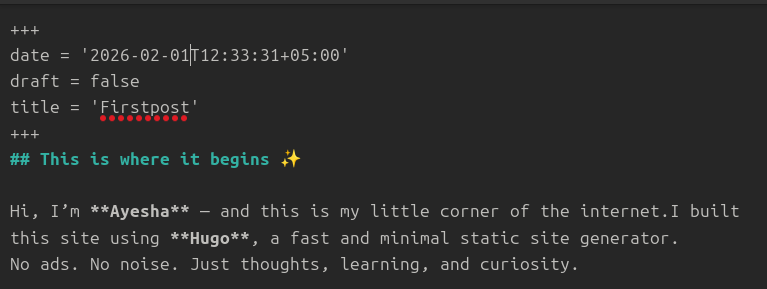
hugo new posts/Firstpost.md
Edit the Markdown file in posts such as
START THE HUGO SERVER :
Run the command :
hugo server --noHTTPCache
Now before pressing ctrl+C , visit http://localhost:1313 and your website will be running locally.
DEPLOYING TO GITHUB :
To deploy your site on GITHUB follow the given steps :
- Open GITHUB.
- Create a new Repository.
- And give it a name in this order :
username.github.io
UPLOAD THE SITE TO GITHUB :
Connect your local website to GITHUB REPOSITORY By using the given command :
git remote add origin https://github.com/<your-username>/<your-username>.github.io
For example :
git remote add origin https://github.com/eivrach/eivrach.github.io
Lastly Push your site to GITHUB through this command :
git push -u origin master
ENABLE GITHUB PAGES :
In the settings tab of your repository ,Inside the “BUILD AND DEPLOYMENT” section change the source to “GITHUB ACTIONS”.
CONFIGURE GITHUB WORKFLOW :
Inside your ACTION TAB , search for HUGO. Create a workflow and configure that file. And also change your HUGO VERSION in that file according to your HUGO VERSION

After this commit the change and the workflow will run successfully and your site will be launched at
username.github.io
Finally ,open pages in settings tab there you’ll see your site running successfully
Hugo is a fast and efficient static site generator used to build websites and blogs using simple Markdown files. It generates complete static pages without requiring a database or backend. Because of this, Hugo websites are secure, lightweight, and very fast to load.
GOOD LUCK